- How do I add pictures to my online account?
- Can I organize my pictures?
- How do I change the name of the album I am uploading to?
- How do I upload from iPhoto?
- What kind of files can I upload to your site?

November 13, 2010
Organizing Albums in your Persnickety Account
Helpful Links:


November 10, 2010
How to create a custom Holiday Card
Create and Order Holiday Photo Greeting Cards
with Persnickety Prints customizable templates!
Photo Paper: Matte, Glossy, Metallic (4x6, 4x8, 5x5, 5x7, 6x8)
Premium Cardstock: White, Linen, Pearl (4x8, 5x7)
1) Choose between slimline (flat) or folding cards. Most holiday cards are slimline, though you can use whichever style you want. If you select slimline cards, choose a size. Typically, holiday slimline cards are 4x8. Specify whether you want a portrait (vertical) or landscape (horizontal) orientation.
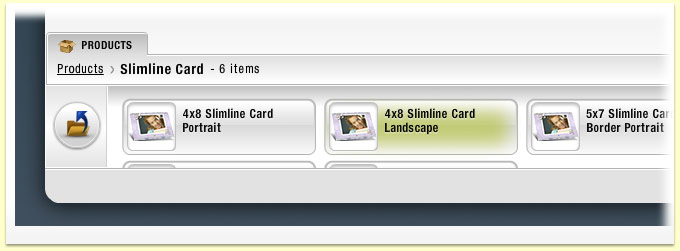
2) Choose the card category and template. Look at the templates in the "Christmas," "Hanukkah," "Kwanzaa," or "Holidays" themes. Select the one you like best.

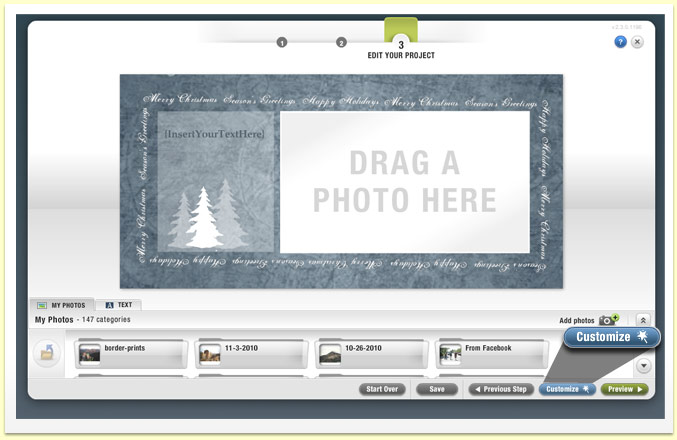
3) Drag the photo(s) you wish to use from the bottom of the page and drop them onto the card. Click the "Edit Photo" button to move, pan, or crop it within the card. Then, click on the text box to add your own custom message and edit the text color and font.

4) Click "Customize" to add more photos, text, graphics, and change the layout of the card. When you are finished, click "Preview," and click "Add to Cart" to place your order. That's it!
Get Started HERE
If you have your own design- order as a single print and choose the 25 Pack Photo Card option.

We have envelopes for 4x6, 4x8, 5x5, 5x7, 6x8.
Envelopes are always included.
November 4, 2010
Holiday Cards


MOST online companies are charging on average $2 a card.
Check out these Persnickety Prices! We don't skimp on the quality-
ALL photo cards are printed on professional photo paper and premium card stock.
ALL photo cards are printed on professional photo paper and premium card stock.

Get Started! December will be here before you know it!

Get 10% off all Holiday Cards when ordering before December 1st!
use coupon code: earlybird
expires: Nov 30th!
October 27, 2010
Order from Facebook
Did you get the News? (if not, sign up!)
Facebook photos have always been fun to look at, but virtually impossible to print ... until now. To order prints of any of your Facebook photos, including photos you are tagged in, simply install the Facebook photo ordering app from your Facebook account.
The app is still a Beta release, meaning your feedback is welcome to help make it perfect via the feedback link in the app. Once it is installed, select the photos you wish to order, press "Add to Cart" to put them in your shopping cart, and when you are ready to order, press "Go to Cart" to open the shopping cart and complete the order. The order is sent to us at Persnickety Prints, just as any other order you place using your online photo account.

Ordering Facebook photos is a great way to preserve your memories so you can enjoy your Facebook photos anytime, even when you are not in front of a computer.
I recommend ordering smaller sized prints from Facebook. Images are compressed when posted online and are usually too low to print anything larger than a 5x7 or 8x10.
Facebook recently enabled a new feature that allows you to upload high resolution photos, so next time you upload to Facebook, choose the high resolution option for better quality prints.
Video Tutorial:
Facebook photos have always been fun to look at, but virtually impossible to print ... until now. To order prints of any of your Facebook photos, including photos you are tagged in, simply install the Facebook photo ordering app from your Facebook account.
The app is still a Beta release, meaning your feedback is welcome to help make it perfect via the feedback link in the app. Once it is installed, select the photos you wish to order, press "Add to Cart" to put them in your shopping cart, and when you are ready to order, press "Go to Cart" to open the shopping cart and complete the order. The order is sent to us at Persnickety Prints, just as any other order you place using your online photo account.
Ordering Facebook photos is a great way to preserve your memories so you can enjoy your Facebook photos anytime, even when you are not in front of a computer.
I recommend ordering smaller sized prints from Facebook. Images are compressed when posted online and are usually too low to print anything larger than a 5x7 or 8x10.
Facebook recently enabled a new feature that allows you to upload high resolution photos, so next time you upload to Facebook, choose the high resolution option for better quality prints.
Video Tutorial:
Subscribe to:
Posts (Atom)